This is a SEO version of NDTC_User_Guide. Click here to view full version
« Previous Page Table of Contents Next Page »19

Step 4c: Your Recording
If you set a recording, you don’t need to do anything else.
Once your program begins, your set top box will record it for you. To watch your recording, go to DVR.
Setting a Series Recording
Note: Recording is not available if your set top box doesn’t support it. If you choose to record a program that is part of a regular series, you will be offered the option to record the series. This allows you to record every episode of a favorite program.
Step 1: Pick a Program
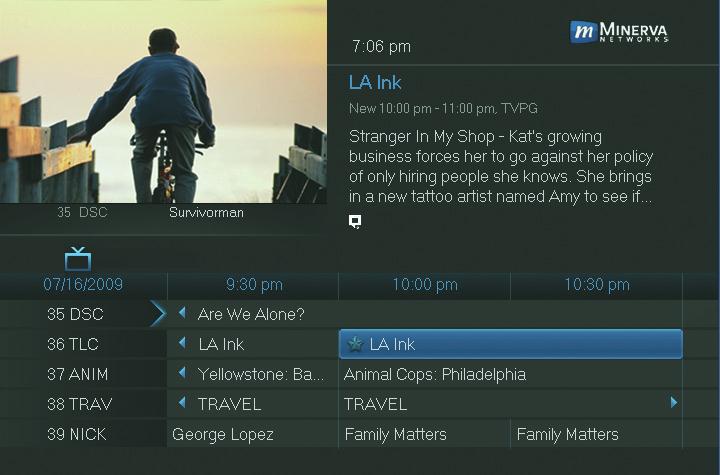
Find any episode of the series you want to record. Highlight the program listing and press OK.
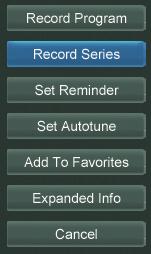
Step 2: Set the Recording Highlight Record Series and press OK.
Step 3: Return To Guide
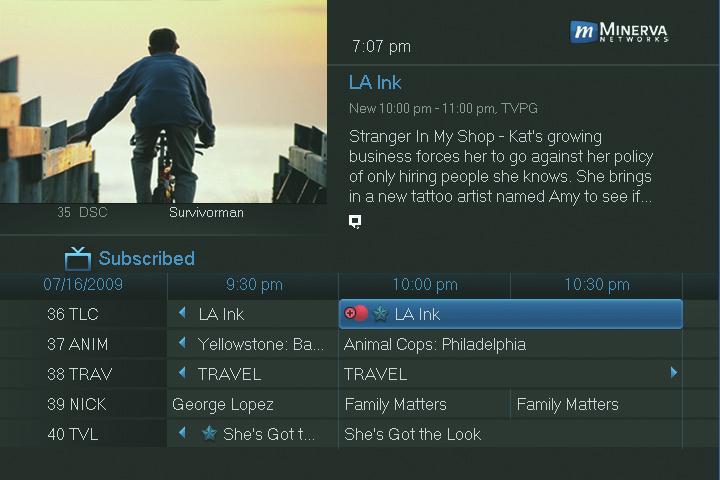
Once you have set the series recording you will be returned to Guide. The program listing now shows an icon next to the program’s name.
Series Recording set
Every upcoming episode of the series will be recorded.

6 Guide & Recording
This is a SEO version of NDTC_User_Guide. Click here to view full version
« Previous Page Table of Contents Next Page »