This is a SEO version of NDTC_User_Guide. Click here to view full version
« Previous Page Table of Contents Next Page »3
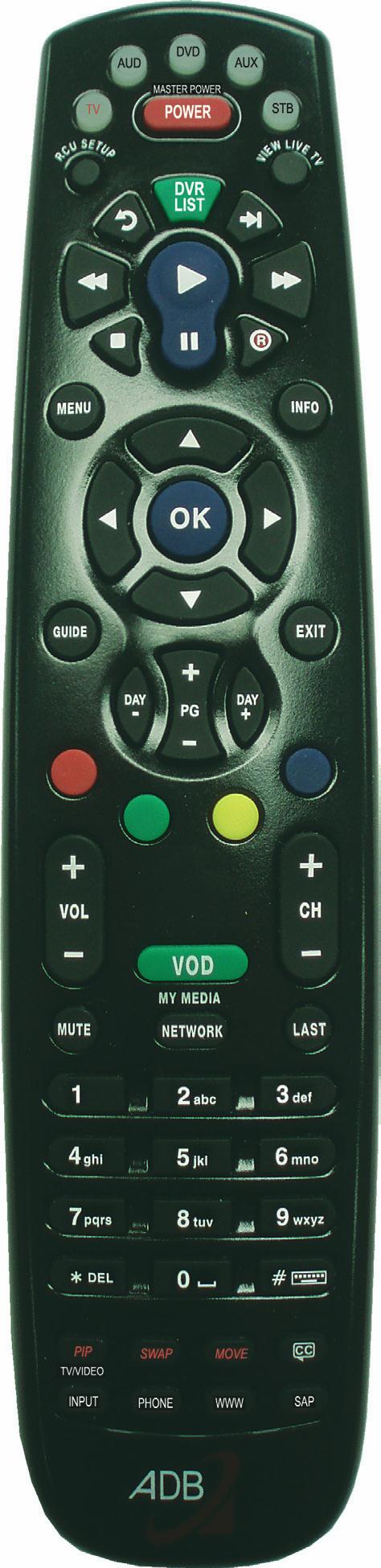
Device Selection Send commands to TV, audio, DVD, auxiliary device or set top box RCU SETUP Setup remote DVR LIST For future use MENU
Displays Menubar Arrow Keys Move the highlight in menu screens GUIDE Displays Guide DAY - / DAY + Jumps Guide 12 hours ahead or back Function Buttons For future use VOL + / - Adjust volume MUTE
Toggle audio on or off
Number Pad Enter a channel number or PIN WWW For future use INPUT Access Devices PHONE
Display Caller ID Log
POWER Turn a selected device on or off Playback Controls Control playback of DVD, DVR or VOD
RECORD Begin DVR recording
INFO Display the Infobar
OK Enter a choice you
have made
EXIT Close any screen and return to TV
PG + / - Jump Guide 1 page
up or down CH +/- Change the channel
VOD Display Rentals
LAST Return to previous
channel CC Toggles closed captions on or off
SAP Toggles Secondary Audio Program on
or off
ADB Potenza Remote
This is a SEO version of NDTC_User_Guide. Click here to view full version
« Previous Page Table of Contents Next Page »