This is a SEO version of NDTC_User_Guide. Click here to view full version
« Previous Page Table of Contents Next Page »2
Remote Control Layout
STB
Send commands to the set top box TV
Send commands to the TV AV
Choose between your TV’s different connections Mute
Toggles audio on/off Vol +/-
Adjust the volume; in Guide jumps listings 12 hours ahead/ back
Closed Caption Toggles closed cap-tions on or off Menu
Display the Menu Bar
Direction Buttons Move the highlight in system screens OK
Enter a choice you have made Back
Tune to the previous channel
Function Buttons Reserved
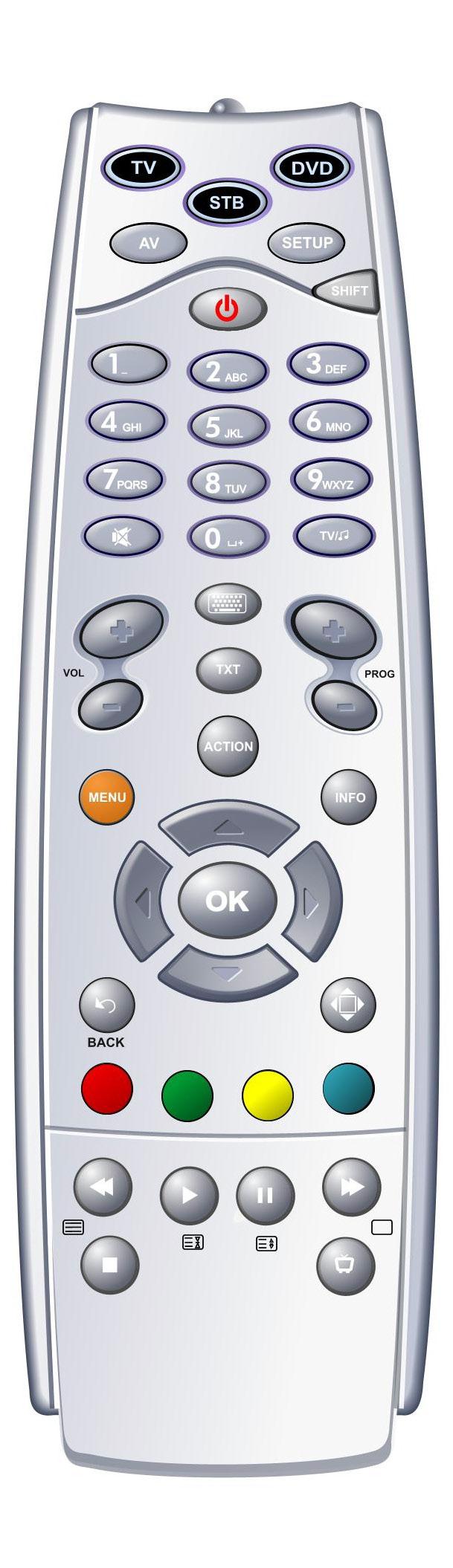
DVD Send commands to the DVD player
Power Turn a selected device on or off
Shift Used to program your remote control
Number Pad Enter a channel number or PIN Keyboard Displays an on-screen keyboard
Prog +/- Change the chan-nel; in Guide jumps listing one screen ahead/back Action|Guide Displays Guide
Info Display the Info Bar
Exit Close any screen and return to TV Playback Controls Control playback of Video On Demand and PVR-recorded
programs.
ADB Focus Version 1 Remote Control
This is a SEO version of NDTC_User_Guide. Click here to view full version
« Previous Page Table of Contents Next Page »