This is a SEO version of NDTC_User_Guide. Click here to view full version
« Previous Page Table of Contents Next Page »64
ADB 5810 Set Top Box
1. Ethernet Connects the set top box to the video service using a CAT5 Ethernet cable.
2. HDMI (High Defnition Media Interface) Connects the set top box to your HDTV using an HDMI cable - provides audio and video. 3. Pr/Pb/Y (Component Video) Connects the set top box to your TV to provide very high-quality video - provides video only.
4. VCR Audio Right/Audio Left/Video Connects the set top box to your VCR to provide good quality stereo audio and video.
5. S-Video Connects the set top box to your TV to provide high-quality video - provides video only.
6. TV Video Connects the set top box to your TV to provide good quality video.
7. TV Audio R/L (Audio Left/Right) Connects the set top box to your TV to provide good quality stereo audio.
8. To TV Connects the set top box to your TV using a standard coax cable - provides audio and video.
9. S/PDIF Connects the set top box to a home theater system to provide surround sound audio - provides audio only. 10. 12V DC 4A Provides power to the set top box.
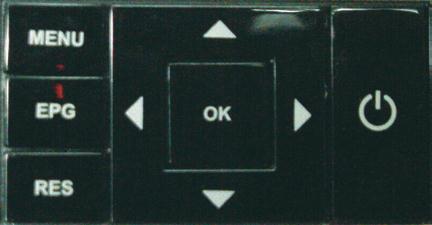
You can also use the front panel buttons of the ADB 5810 set top box to replace the basic remote control functions. Use MENU to display the Main Menu, EPG to display Guide, RES to change screen resolutions, and the arrow and OK buttons as you would those on the remote control.
1 2 3 4 5 6 7 8 9 10
Set Top Box
This is a SEO version of NDTC_User_Guide. Click here to view full version
« Previous Page Table of Contents Next Page »