This is a SEO version of NDTC_User_Guide. Click here to view full version
« Previous Page Table of Contents Next Page »53
12 Settings

Highlight New Password to enter the password for the new account. Use the Number Pad on your remote to enter the password.
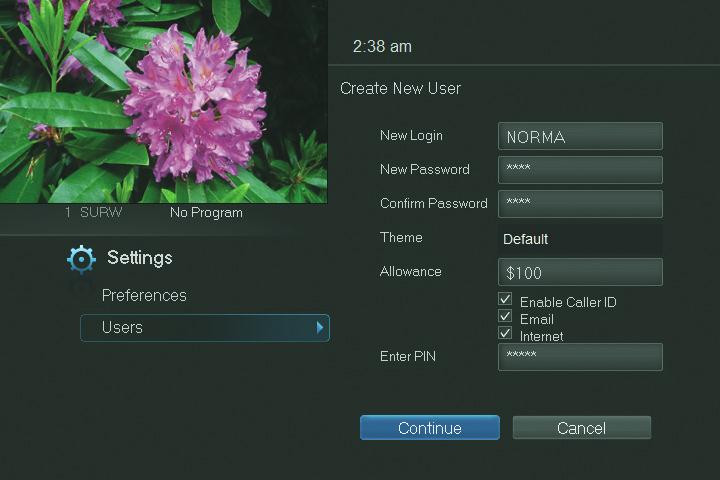
Highlight Confirm Password to re-enter the password for the new account. Use the Number Pad on your remote to re-enter the password exactly.
See 2 How To Use This Book for details on Theme.
Highlight Allowance $ to enter a limit to the amount of programs that can be purchased per month for the new account. Use the Number Pad on your remote to enter a whole dollar amount (e.g. 200 to limit the account to $200.00).
Highlight the Enable Caller ID check box and press OK to enable or disable Caller ID alerts to appear on the screen for this user account.
Highlight Enter PIN to enter the master account’s PIN as a further way of verifying the master account holder is creating this account. Use the Number Pad on your remote to enter the PIN.
Now highlight Continue and press OK to go to the next Add User Account screen.
This is a SEO version of NDTC_User_Guide. Click here to view full version
« Previous Page Table of Contents Next Page »