This is a SEO version of NDTC_User_Guide. Click here to view full version
« Previous Page Table of Contents Next Page »50
12 Settings

Working With Settings/Users
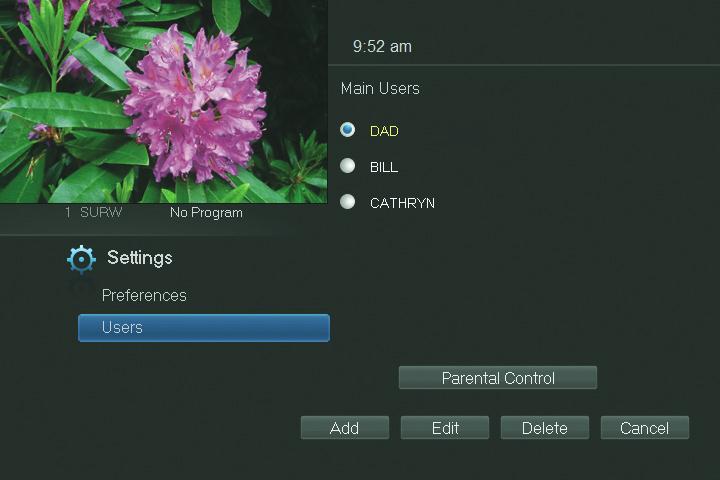
User accounts allows you to have separate parental controls, purchase limits and themes for different family members. Users Settings allows you to add a user account, edit an existing user account, change parental controls for a user account, or delete a user account. Note: The master account is the first account listed and is shown in yellow rather than white. You cannot delete the master account and cannot change the login name for the master account.
Go To Parental Controls
To change the parental controls for an account, highlight that account and press OK. Then highlight Parental Controls and press OK.
Parental Controls
Parental Controls allows you to set ratings restrictions for each user.
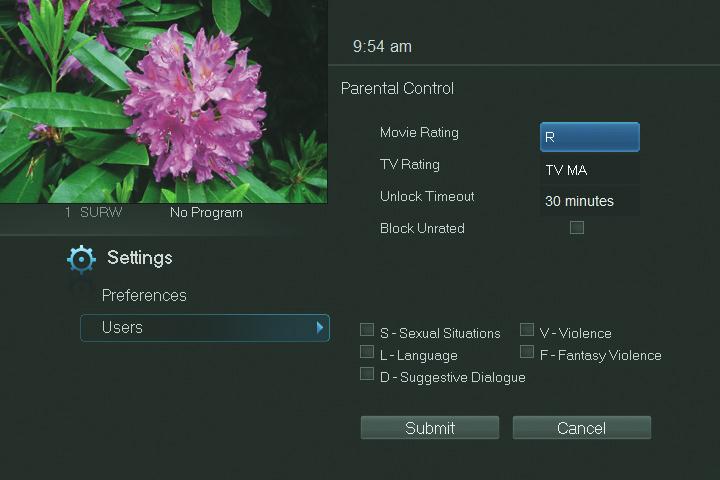
Movie Rating
Movie Rating determines the highest rating for movies that will not be blocked.
This is a SEO version of NDTC_User_Guide. Click here to view full version
« Previous Page Table of Contents Next Page »