This is a SEO version of NDTC_User_Guide. Click here to view full version
« Previous Page Table of Contents Next Page »47
12 Settings

Introducing Settings
Settings gives you control over your video service. You can choose to share purchased programs, change how alerts appear on your screen, create parental controls and block channels. You can also create accounts for members of your family.
Go To Settings
Press MENU and highlight Settings. Then enter your password, highlight OK and press OK. There are two main sections of Settings: Preferences and Users.
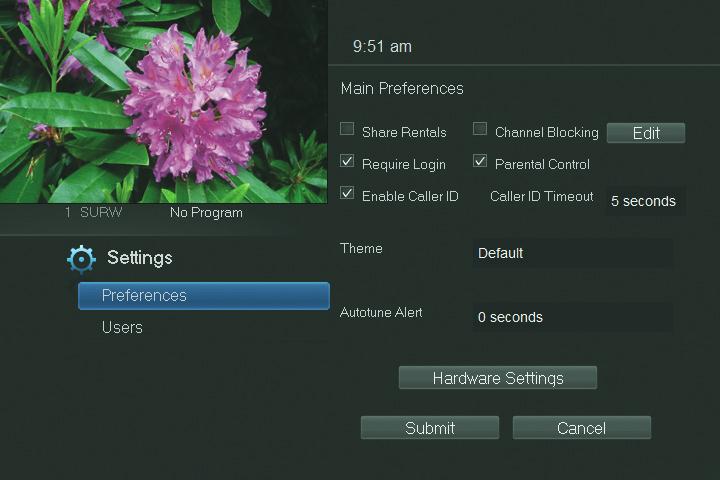
Preferences - settings that affect your overall service. This includes if purchased programs are shared between users, if users must log in, how on-screen alerts are handled, parental controls and blocked channels that apply to everyone.
Working With Preferences
NOTE: Share Rentals and Require Login are only needed if you intend to use User Accounts (i.e. an account for children). Share Rentals
Share Rentals makes purchased programs available for any user (enabled), or only available to the user who makes the purchase (disabled).
To turn Share Rentals on or off, highlight the check box and press OK. Require Login
Require Login determines if a user name and password must be entered before being able to use your TV service.
To turn Require Login on or off, highlight the check box and press OK. Enable Caller ID
Enable Caller ID turns on or off screen alerts for incoming Caller ID.
This is a SEO version of NDTC_User_Guide. Click here to view full version
« Previous Page Table of Contents Next Page »