This is a SEO version of NDTC_User_Guide. Click here to view full version
« Previous Page Table of Contents Next Page »17
6 Guide & Recording

Introducing Guide & Recording
A DVR is a great tool for digitally recording your favorite programs without the need for tapes or discs. In this section, you will learn about setting or scheduling a recording, recording a series, and editing a series recording.
Introducing Scheduled Events
A Scheduled Event is any setting you create that causes the system to remind you about a program or record a program automatically. There are three types of Scheduled Events: Reminders, Autotunes and Recordings. A Reminder informs you a program is about to come on. An Autotune automatically changes the channel when the program is about to start. A Recording will automatically record the program to your set top box. Note: Your set top box must support recording to use the Record event.
Setting a Reminder, Autotune or Recording
Step 1: Pick a Program
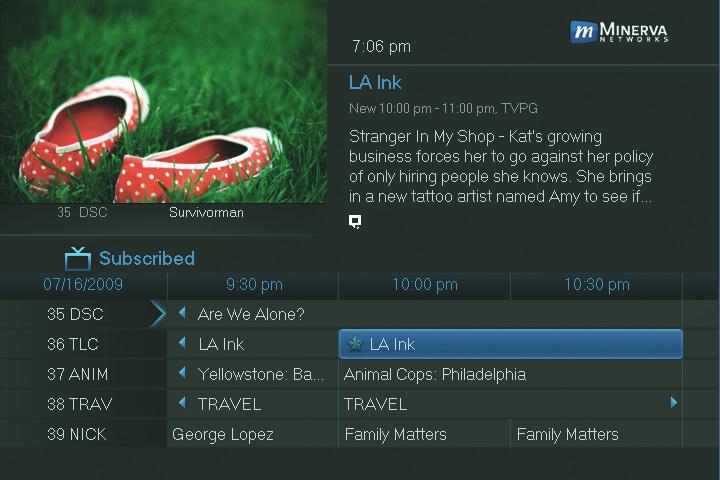
Find the program you want. Highlight its listing and press OK. Note: If you are setting a recording, highlight the listing and press RECORD instead of OK, then skip steps 2 and 3.
Step 2: Set the Reminder, Autotune or Record Highlight

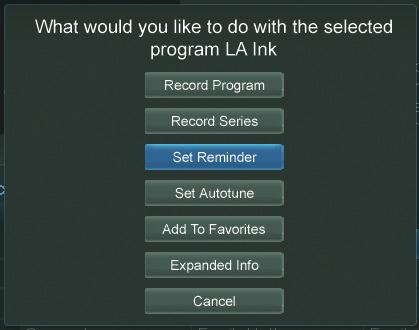

or
or
and press OK. You will then be returned to Guide.

This is a SEO version of NDTC_User_Guide. Click here to view full version
« Previous Page Table of Contents Next Page »